Knowledgebase

Approving a Google Ads Partner Request from Us

If we requested access to your Google Ads account (provided you gave us your account number for us to send the request), you’ll get the following email from Google:

edbsnc4613e45290bf97fdff63bf0ec30dcd119457ee3de903a80dafc075e76b6dcad4713b3be3e0672b913930157ed52ffd63df9c1da48958bf25e485b9e290d6f1d?inline=true

If you click on the blue Accept Request button, you will be taken to the Managers tab on the Account Access page of your Google Ads account.edbsndd47c000886b952d46bcd36c25d7229c95c344b2b153f9a072414ca90ad86d846a188a716601d8559d7e43409f206d3a4f5e91446d1ed6530ed5d6cddb32fbe8?inline=true

Here, all you have to do is click Accept and we will have access to your account.

WHAT TO DO IF YOU DON’T GET THE EMAIL FROM GOOGLE

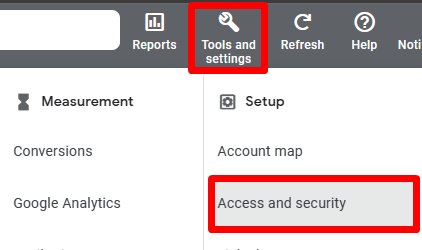
If you didn't get the email from Google, don't panic. Head to your Google Ads account, click on the Tools & Settings icon in the top bar, and then click Account & Security under Setup.

You’ll end up on the Users tab, shown below.
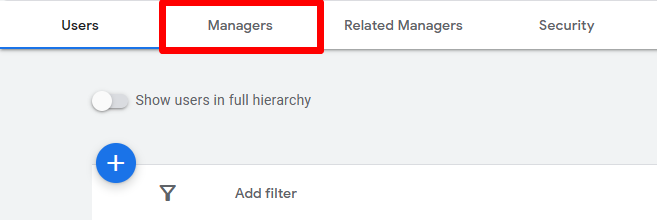
Click on the Managers tab to see and approve the pending request that we sent.

edbsndd47c000886b952d46bcd36c25d7229c6fdec7dafb5aad33e5d8b5a09182e6e60ae252d07a8f76654b94f6f4e9280111d5f6d4f3e12186928bf5a7cc08f4be34?inline=true

edbsndd47c000886b952d46bcd36c25d7229c96b7ce97d3ba5daefdc2be846d5faed88e9697ebc0cc3648151564dd406a5a339ee416ce7ba6b7667b812422eb0aa45a?inline=true

Under Actions, Click Accept! You're done, we now have access to your Google Ads Account.
  • 0 Users Found This Useful

Was this answer helpful?

Related Articles

Requesting Access to Google Tag Manager

If you already have a GTM (Google Tag Manager) Account you can share this with us. GTM is the...

Sharing Access to Google Analytics

When we set up a new website, we create a Google Analytics Account, Google Analytics gives you...

Providing us with your Facebook Business ID

If you have engaged Breeze Marketing to run a Facebook Ad Campaign, or to allow us to gain...

  Tag Cloud